Apple’s New Mac mini and Mac Studio Put Local AI Front and Center
The M6 and M5 Pro Mac mini and the M5 Max and M5 Ultra Mac Studio promise major gains for local models. We are eager to find out what those gains look like outside Apple’s demos.
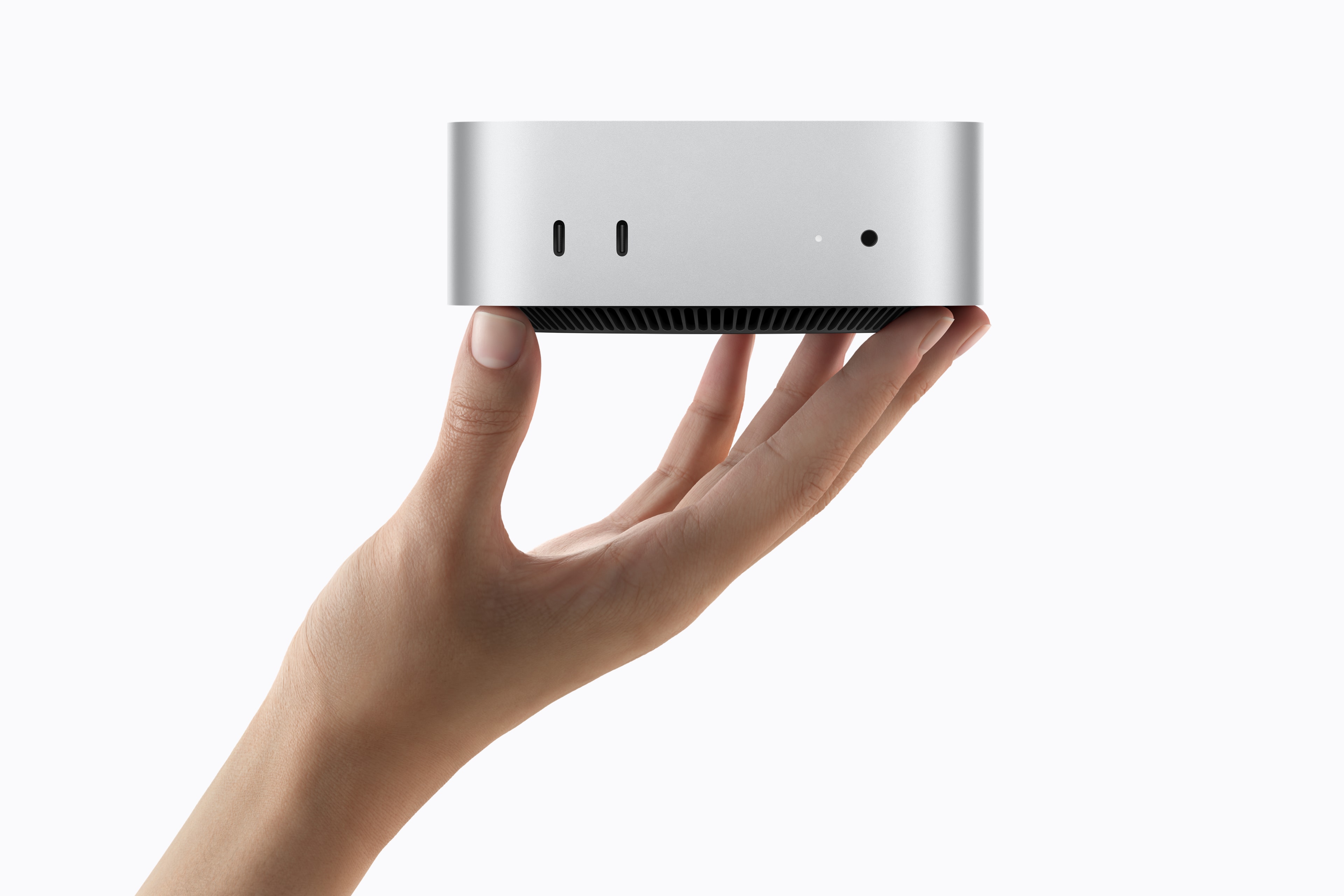
Apple’s New Mac mini and Mac Studio Put Local AI Front and Center
Apple refreshed both ends of its desktop lineup last week, and this is not a routine speed bump.
The new Mac mini arrives with a choice of M6 or M5 Pro. The new Mac Studio moves to M5 Max and the all-new M5 Ultra. Across all four chips, Apple is emphasizing faster AI processing, Neural Accelerators in the GPU, higher memory bandwidth, and machines designed to run models on the desk rather than send every request to a cloud service.
That is exactly the direction we have been hoping to see.
At Loki’s Lab, we care less about the launch-day superlative and more about what a computer can actually finish: Which local models fit? How quickly do they answer? Does added speed preserve quality and accuracy? What happens when context grows, a vision input is added, or the machine is asked to run continuously?
We do not have those independent answers for the new Macs yet. Apple opened preorders on August 25, but says the new systems will begin arriving on September 22, 2026. The 512GB M5 Ultra configuration is scheduled for late October. As soon as we can get the hardware into the lab, we plan to put it through the same kind of practical local-model testing shown in the Loki’s Lab results.
For now, the specifications alone give us plenty to be excited about.
By Jack Blair · September 1, 2026
The new desktop lineup at a glance
| Mac | Starting price | Maximum unified memory | Memory bandwidth | Why it interests us | |---|---:|---:|---:|---| | Mac mini with M6 | $899 | 32GB | 170GB/s | Compact entry point for smaller local models and always-on agents | | Mac mini with M5 Pro | $1,699 | 64GB | 307GB/s | Potential local-AI sweet spot with more model headroom and Thunderbolt 5 | | Mac Studio with M5 Max | $2,499 | 128GB | Up to 614GB/s | Serious single-user AI workstation without Ultra pricing | | Mac Studio with M5 Ultra | $5,499 | 512GB | 1.2TB/s | Enormous on-device model capacity and a new ceiling for desktop Macs |
Those are U.S. starting prices announced by Apple, not the price of every maximum-memory configuration. Memory upgrades can change the value equation substantially, and the operating system and model runtime also consume part of the advertised unified-memory pool.
Mac mini with M6: the small local-AI appliance
The base Mac mini is now built around M6, with a 12-core CPU, 12-core GPU, a Dual 16-core Neural Engine, and 170GB/s of memory bandwidth. It starts with 16GB of unified memory and can be configured with 24GB or 32GB.
Apple says the M6 mini can process LLM prompts in LM Studio up to 4.8 times faster than the M4 comparison system it tested. That is an eye-catching claim, but it is still an Apple result produced with Apple’s chosen configuration, model, software, and settings. It is a reason to test—not a substitute for testing.
The 32GB ceiling is the more immediate story for local-model users. A smaller quantized model, embedding model, coding assistant, or lightweight agent may be an excellent fit for a quiet five-inch desktop. Larger models and long context windows will run into memory pressure sooner. The model file is only part of the requirement; context, cache, runtime overhead, and macOS all need room too.
That makes the M6 mini potentially compelling as an efficient everyday AI box, especially for a home lab, office assistant, local API endpoint, or private document workflow. It is less likely to be the machine for someone whose first priority is loading the largest model possible.
Apple also upgraded networking to Wi-Fi 7, Bluetooth 6, and 2.5Gb Ethernet as standard, with 10Gb Ethernet available. Three rear Thunderbolt 4 ports, HDMI, and two front USB-C ports make the tiny system easier to integrate into a real desk or lab.
Mac mini with M5 Pro: the configuration to watch
For our purposes, the M5 Pro Mac mini may be the most interesting announcement of the four.
It supports up to an 18-core CPU and 20-core GPU, up to 64GB of unified memory, and 307GB/s of memory bandwidth. Its rear connections step up to Thunderbolt 5, while 2.5Gb Ethernet remains standard and 10Gb Ethernet is optional.
Sixty-four gigabytes crosses an important practical boundary. It does not guarantee that every large model will fit or run well, but it creates meaningfully more space for weights, context, and the rest of the system than the 32GB M6 configuration. It could become the balanced choice for people who want a capable local-model server without moving all the way to Mac Studio pricing.
Apple says its M5 Pro mini delivered up to four times the LM Studio prompt-processing performance of an M4 Pro in its test. We are particularly curious about that comparison because Loki’s Lab already has M4-class results. A repeatable M5 Pro run can tell us whether the improvement appears across several models and tasks, or whether it is concentrated in a narrower benchmark condition.
The starting price is $1,699, so memory configuration will matter. We would not judge this machine from the entry specification alone. For local AI, the useful question is likely to be how a 48GB or 64GB configuration performs per dollar against both the M6 mini and the 36GB or 64GB tiers of Mac Studio.
Mac Studio with M5 Max: the practical powerhouse
The M5 Max Mac Studio starts at $2,499 with a 36GB unified-memory configuration. It can be configured with up to 128GB of memory, an 18-core CPU, and a 40-core GPU. Memory bandwidth rises from 460GB/s on the standard GPU configuration to as much as 614GB/s on the higher-end configuration.
This is where model capacity and generation speed may begin to meet in a particularly useful way. Unified memory allows the CPU and GPU to work from the same pool, and Apple’s MLX framework is designed around that architecture. A 64GB or 128GB Studio may offer enough room for substantially larger quantized models while retaining the bandwidth needed to make them pleasant to use.
Apple claims up to 3.9 times faster LM Studio prompt processing than M4 Max in its selected comparison. We want to know how that translates to full responses, time to first token, sustained generation, large contexts, vision workloads, and simultaneous requests. A model that launches quickly but slows under a realistic workload tells a different story than a benchmark built around one prompt.
The M5 Max Studio feels like the likely workstation choice for developers, creators, and researchers who want strong local inference without paying the M5 Ultra premium. Whether it is the best value will depend heavily on memory pricing and what the M5 Pro mini can do at 64GB.
Mac Studio with M5 Ultra: a new memory ceiling
Then there is the M5 Ultra.
The top Mac Studio can be configured with a 36-core CPU, 80-core GPU, 512GB of unified memory, and 1.2TB/s of memory bandwidth. The standard M5 Ultra configuration begins with 96GB of memory, while 256GB and 512GB options move the system into territory that previously required far more specialized hardware.
Half a terabyte of unified memory does not make every model fast, nor does it turn a desktop into a replacement for every multi-GPU server. It does mean that model weights which cannot fit on ordinary consumer GPUs may fit entirely on one compact machine. Keeping a model local can also reduce dependence on usage-based cloud billing and keep sensitive prompts and documents on hardware you control.
Apple is also promoting multi-system clustering through Thunderbolt 5 and remote direct memory access. The company says a four-Studio cluster can provide up to three times the AI inference performance of one system. That is fascinating, but it raises many questions we want answered: setup complexity, supported runtimes, scaling efficiency across different models, thermals, power use, and total cost compared with conventional GPU servers.
At a $5,499 starting price—and considerably more when configured with maximum memory—the M5 Ultra Studio is not the default recommendation for most people. It is a laboratory platform, professional workstation, or departmental AI appliance. The exciting part is that this level of local model capacity now exists in a quiet desktop form factor.
Why unified memory matters—and why it is not magic
Apple silicon uses a unified-memory architecture in which the CPU and GPU can access the same memory pool. Apple’s open-source MLX framework is designed to take advantage of that arrangement, and software such as LM Studio supports both MLX and llama.cpp runtimes on Apple silicon.
For local models, the advantage is straightforward: a Mac configured with 64GB, 128GB, or more is not restricted to the memory attached to a separate graphics card. More of the machine’s memory can be available to the accelerated workload.
But unified memory does not erase limits. macOS needs memory. The runtime needs memory. Context and key-value cache need memory. Vision inputs, concurrent sessions, and agent tools can raise requirements. Quantization can shrink a model but may affect output. Bandwidth can strongly influence inference speed, while compute, runtime optimization, prompt processing, thermals, and model architecture also matter.
That is why a specification sheet can tell us what is plausible, but not which Mac is the best buy.
What Loki’s Lab plans to test
Once the new Macs are shipping and available to us, we want to measure them as computers people will actually use—not merely repeat a launch chart.
Our planned questions include:
- Which tested models load successfully at each memory tier?
- How do M6, M5 Pro, M5 Max, and M5 Ultra compare on the same prompts and model builds?
- What are the median response time, time to first token, and sustained generation rate?
- Do quality, accuracy, and task completion remain consistent as speed changes?
- How much usable memory remains after macOS and the runtime are accounted for?
- What happens with longer context, vision models, coding agents, and parallel requests?
- How do noise, thermals, power use, and sustained performance behave during repeated runs?
- Where is the real price-to-performance sweet spot after memory upgrades are included?
We will also compare the new results with the M4 systems already represented in the Loki’s Lab fleet. That matters because the best upgrade is not necessarily the newest chip. A discounted previous-generation Mac with enough memory may remain a better value than a faster new machine configured too narrowly.
Our early read
The M6 Mac mini looks like an appealing compact host for smaller local models and always-on personal tools. The M5 Pro Mac mini, especially with 64GB, is the machine we suspect could become the value standout. The M5 Max Mac Studio offers the most convincing balance for a serious single-user AI workstation, while the M5 Ultra Mac Studio pushes local model capacity into a different class entirely.
That is our hypothesis, not our verdict.
Apple’s new desktops are available to preorder now and are expected to begin shipping September 22. We are excited by what the hardware makes possible, and we will publish Loki’s Lab results as soon as we can test the machines fairly and repeatably.
The launch tells us where Apple believes the Mac is going. The lab will tell us how quickly it gets there.
Sources and testing note
- Apple’s August 25 Mac mini announcement — chips, Apple performance claims, pricing, connectivity, and September 22 availability.
- Mac mini technical specifications — CPU/GPU configurations, unified-memory limits, bandwidth, storage, and ports.
- Apple’s August 25 Mac Studio announcement — AI positioning, Apple performance claims, pricing, clustering, and availability.
- Mac Studio technical specifications — CPU/GPU configurations, memory tiers, bandwidth, storage, and display support.
- Apple MLX unified-memory documentation — how MLX uses Apple silicon’s shared memory pool.
- LM Studio documentation — local GGUF and MLX runtime support on Apple silicon.
- Loki’s Lab test results — the existing comparison set that will provide context for future M5- and M6-class results.
Testing note: All performance figures attributed to Apple are vendor results, not Loki’s Lab findings. They may use different models, prompts, software versions, quantizations, contexts, and configurations. Loki’s Lab has not yet tested the M6, M5 Pro, M5 Max, or M5 Ultra desktops announced on August 25, 2026.

Jack Blair
Writer & tester
Jack Blair is an independent documentary filmmaker, storyteller, and lifelong technology obsessive. Through Happy Jack Media, he explores overlooked human stories and experiments with new ways to create and connect. He founded Loki's Lab as a community where curious people can test local AI models, share what they learn, and discover what today's technology can do on the computers they already own.
View author profile →